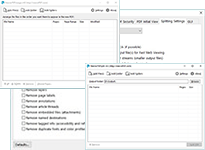
Neevia PDFmerge/split is a Windows application that can help you easily combine/merge PDF files or extract information from PDF documents by splitting them into smaller and more manageable files.
As PDF files become increasingly complex having an application that can help you easily
combine documents or extract information from PDF documents by splitting them into smaller
and more manageable files is essential.
Neevia PDFmerge/split is a cost efective application that comes with
powerful PDF merging/splitting capabilities which can be of real help
in managing PDF documents.
It can also be used by developers to integrate with their applications.
PDFmerge/split comes as a graphic interface application, a command line tool, COM object and .NET assembly.
KEY FEATURES
Merge several PDF files into one file;
Merge a specified range of pages;
Create bookmarks, during merging, for each input PDF;
Split PDF file(s) into parts with a specified number of pages;
Split PDF file(s) by bookmarks;
Fully multi-threaded;
Linearization (Fast Web View) support;
PDF encryption support (RC4/AES algorithms);
Does NOT require any Adobe products;
SUPPORTED OPERATING SYSTEMS
The operating systems listed here have been tested with Neevia PDFmerge/split and are officially supported:
Windows Server 2025 64-bit edition
Windows Server 2022 64-bit edition
Windows Server 2019 64-bit edition
Windows Server 2016 64-bit edition
Windows 11 32-bit and 64-bit editions
Windows 10 32-bit and 64-bit editions
Windows 8 32-bit and 64-bit editions
Windows Server 2012 32-bit and 64-bit editions
Windows 7 32-bit and 64-bit editions
Windows Server 2008 32-bit and 64-bit editions
Windows Vista 32-bit and 64-bit editions
Windows Server 2003 32-bit Web Edition, Standard Edition and Enterprise Edition
Windows Server 2003 x64 Web Edition, Standard Edition and Enterprise Edition
Windows XP Professional and Home Edition with Service Pack 1, 2 or 3
Windows XP x64 Professional with Service Pack 2 or 3
Windows 2000 Professional, Server and Advanced Server
RECOMMENDED HARDWARE
Standard PC; 2GHz or faster compatible x86/x64 processor
RAM: 2GB RAM recommended, 1GB minimum
Hard-disk: 100MB free space recommended, 30MB free space required
Neevia PDFmerge/split, as the name suggests, is an easy to use application that allows you to merge/split PDF files.
How do I merge/split PDF files with Neevia PDFmerge/split?
That can be done directly by running the command line tools (CLmerge.exe, CLsplit.exe), through the graphic interface applications (PDFmerge.exe, PDFsplit.exe) or indirectly through your own application using the COM object or .NET assembly.
What are the main Neevia PDFmerge/split features?
Below are listed the main PDFmerge/split features:
Merge several PDF files into one file;
Merge a specified range of pages;
Create bookmarks, during merging, for each input PDF;
Preserve hyperlinks, forms and annotations;
Split PDF file(s) into parts with a specified number of pages;
Split PDF files by bookmarks;
Remove forms, layers, page labels, annotations during splitting;
Linearization (Fast Web View) support;
PDF encryption support (RC4/AES algorithms);
Does NOT require any Adobe products;
Can I merge/split encrypted PDF files using the Neevia PDFmerge/split graphic interface tool?
Yes you can but you will be prompted for a password every time an encrypted file is encountered.
What is PDF linearization?
PDF linearization is a way to optimize PDF files for more efficient viewing over the web. Pages are loaded faster and the user does not have to wait until the entire PDF file is uploaded by the browser.
How can I order Neevia PDFmerge/split?
You can purchase Neevia PDFmerge/split online at https://www.neeviaPDF.com or via the Neevia Tech Sales Department at . For online orders it may take up to 4 business hours to verify and email the licensing info.
How is Neevia PDFmerge/split licensed?
Neevia PDFmerge/split is licensed per computer.
How much does Neevia PDFmerge/split cost?
The cost of one license is US$149. Discounted volume licensing is available - please see the complete pricelist or contact Neevia Tech Sales Department at for more details.
We also offer discounted pricing for government and educational institutions.
Is site licensing available for Neevia PDFmerge/split?
Yes, Neevia Tech offers a competitive site-licensing program for PDFmerge/split. Please contact Neevia Tech Sales Department at for more details on this type of licensing.
Does Neevia Tech offer redistributable licenses for PDFmerge/split?
Yes it does. Please contact Neevia Tech Sales Department at for more details on this type of licensing.
What payment and delivery options do I have?
All Neevia products can be bought online or through a purchase order. The main delivery method is via email/download.
Does Neevia offer refunds?
Software is non-refundable. All Neevia products can be fully tested before purchase.
What support is offered if I have any technical questions regarding Neevia PDFmerge/split?
Free support for the first year is available to all Neevia customers. Our support department can be reached by submitting a request to . Telephone support is also available - to reach our support department call (954) 893-9343 - 9AM to 5PM EST.
How long does it normally take to receive a response from the support department?
We will respond and solve all technical support issues within two business hours (9AM to 5PM EST). This response time may vary depending on the nature of each issue submitted.
How can I download an evaluation version of Neevia PDFmerge/split?
An evaluation version of Neevia PDFmerge/split can be downloaded from our website - DOWNLOAD
What are the limitations of the evaluation version?
The evaluation version is a fully functional copy of the licensed product. Files created using the evaluation version will contain a "trial" watermark on every page.
Do I need to uninstall my trial version in order to install the full version after I purchase a license?
No. All you need to do is register the Neevia PDFmerge/split with the registration info sent to you after the purchase. This process is fully documented in the Neevia PDFmerge/split User's Manual.